Dashboard guides
One guide for each page of the dashboard, with a screenshot of each step, the errors the page shows and why, and a link to the matching docs page.
Getting around
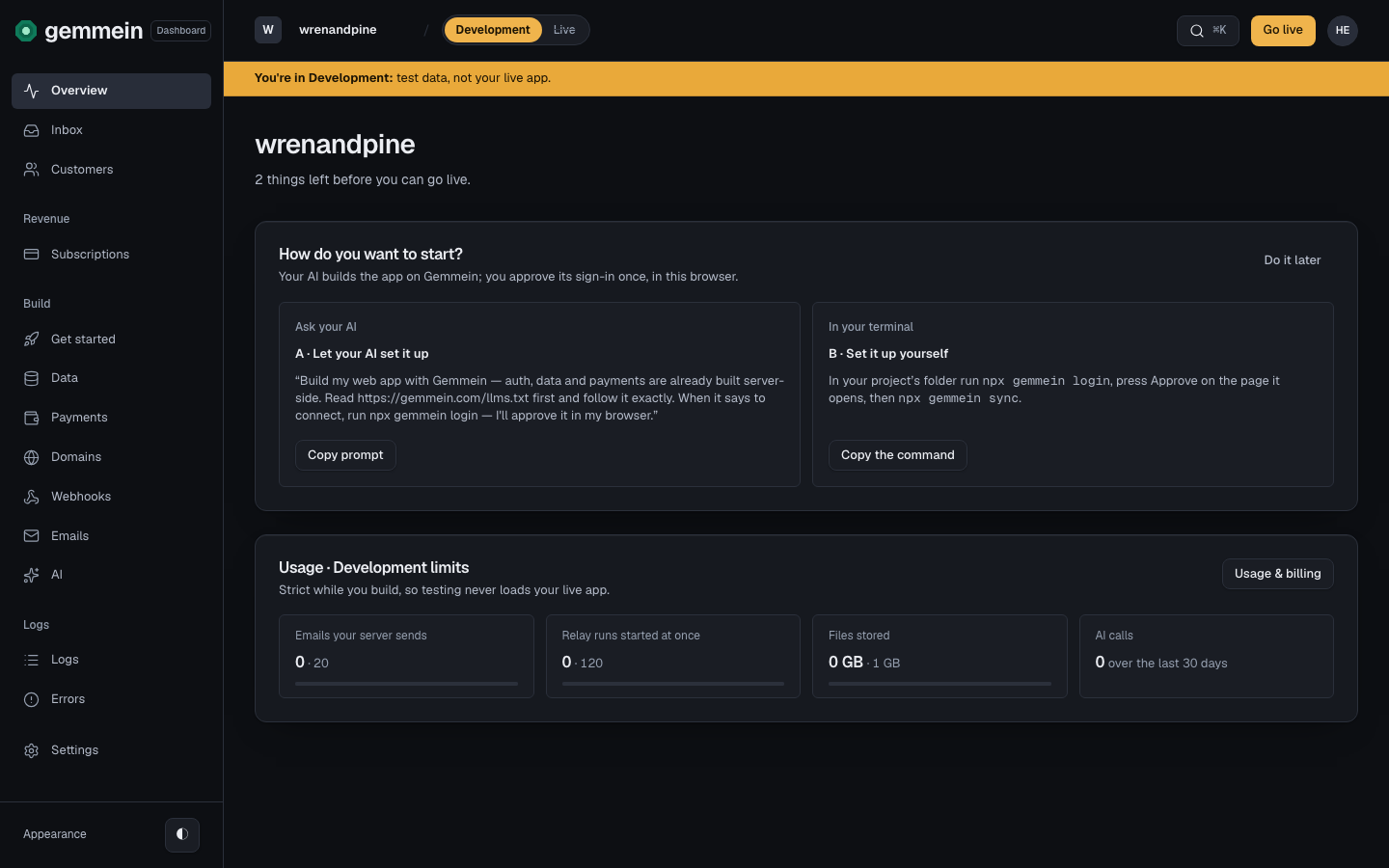
Every page shares the same sidebar, top bar and layout.
The sidebar
- Overview: the first page you see. Before you go live it shows what's left and the next step; after, what needs you, how many people use your app and what it has earned.
- Inbox and Customers: replies from the people using your app, and everyone who has signed in, with a page for each person.
- Revenue: Subscriptions, who pays you and for what.
- Build: Get started (before you go live), Data, Payments, Domains, Relays, Emails and AI.
- Logs: Logs, what happened, and Errors, what Gemmein refused.
- Settings, last: General (after you go live), API keys, Approvals, Usage & billing and Notifications, as tabs at the top of each.
Overview opens first, every time you sign in. Each page also opens at its own address: /data, /webhooks, /errors, /api-keys, /get-started, /notifications and /customers.
Development and Live
A switch in the top bar moves the dashboard between Development, where you build with test data, and Live, the app your customers use. Pages live at /dev/… and /live/…. Before you go live, Live is greyed out with "Go live first" and Development is the only environment there is. After you go live, the dashboard always opens in Live, and switching to Development asks you to confirm every time. Development shows a full-width banner and an amber accent, so the two are never mistaken for each other. Your app's name, the Gemmein bill, Domains and the Inbox are the same in both. Any confirm dialog names its environment ("Confirm in Live" or "Confirm in Development"), and a Live confirmation adds one line: this changes your live app, your customers see it. You go live from the Go live page, opened by the Go live button at the top right.
Search everywhere
Press ⌘K on any page to search the whole dashboard. Part of a page's name jumps to it (keys finds API keys), and an email finds a person or a conversation they sent you. Escape closes it.
Appearance
Appearance (light or dark) is at the foot of the sidebar.
How every page works
Open a page from the sidebar and you land on a list. Choose a row to open its own page, which always starts with a way back to the list. You act on a row from its own page. Forms ask one question per screen, with a progress bar across the top.
On a phone
The sidebar becomes a panel behind the menu button, top left.
Pages
Overview, Inbox and Customers
- Overview: before you go live, what's left and the next step. After, whether anything needs you, how many people use your app and what it has earned.
- Inbox: read replies to your app's emails and answer them from your own sender.
- Customers: a person's summary, their credits (the ledger and a grant), their access, their devices, their activity, and managing them.
Revenue
- Subscriptions: who pays for what, a correction, a comp, a cancellation.
Build
- Get started: every step to go live, how your AI signs in (
npx gemmein login, approved in the browser), the name people see, and the prompt for your coding agent. After you go live it is Settings → General. - Data: your collections, each one's safety rule, its settings (who gets in, publishing, open fields) and what unlocks it.
- Records: search, filter and total a collection's records, open one, or add a new one.
- Payments: the Stripe connection, plans (how each is sold, credits each period, carry-over) and products.
- Domains: your web domain and your sending domain, their DNS records, and the sender names.
- Site: your app's pages, hosted by Gemmein: the private preview your AI publishes to, every version, share links, putting a version live, and taking the live site offline and back online.
- Relays: your relays, each one sentence on what starts it and what it does; a relay from a template, its events, the sender's signing secret, pausing.
- Emails: what your app may email your customers, the new sign-in email, and where its email comes from.
- AI: provider keys (OpenAI, Anthropic, Google or any OpenAI-compatible provider), the AI tools you price, aliases, runs and calls.
- Go live: what's left before you go live and what goes live with your app. After that, promote new collections and fields from Development.
Logs
- Logs: who did what, in your app and on your account.
- Errors: writes Gemmein refused, grouped by error, with the exact error your app received.
Settings
- API keys: the secret keys your own servers use, each limited to collections and what it may do with people; usage, rotating and revoking. Your app's public key is shown here for reference.
- Approvals: every machine your AI signed in from (Revoke ends one at once), requests waiting for you, and every Live action you approved. A change to one customer is your approval alone; a change to how the business runs also asks for the code Gemmein emails, and your authenticator code if you set one up (the list). See Get started for how your AI asks.
- AI assistants: whether an assistant you connect, such as ChatGPT or Claude, may read your customers' details, and the assistants connected now.
- Usage & billing: what Gemmein costs you, and your active people against your plan's limits.
- Notifications: what Gemmein emails you about your app, and which alerts you get.
- Security: how you sign in to Gemmein: the authenticator app, its recovery codes, and this session.
Thanks for telling us.
Thanks for telling us.
Last updated